Changing your domain name can really hit your search engine rankings and therefore traffic to your website. I know: I've been there, and certainly had that done to my blog.
Here's a strong suggestion - as long as you plan to keep blogging or updating your website regularly afterwards, if you can afford to buy and keep paying for your own
domain name (and it now generally costs only £10 a year or less), then you really should
switch to your intended long permanent domain name as soon as you can. Preferably, if you're creating a new blog or website, even
before you start building it up in earnest.
Regular readers may have noticed that I bit the bullet and switched from Blogger's free domain
Blogspot.com to my own domain name, www.consumingexperience.com, on 15 and 16 April 2007, via a 2-step process (I know
Amit noticed!). Well it was certainly an experience, and here are some of the things I learned from it.
Why use your own domain name?
Having your own domain name is generally considered a good thing. It comes across as more professional and is normally more memorable than http://yourISPname.com/~someweirdcombo, or http://yourfreewebspaceprovider.com/ditto.
Notably, it's also a lot more permanent - if you switch ISPs or free webspace providers, you can still keep your own domain name, you just need to move your files to a different host and "point" the domain name behind the scenes to the different location so that anyone trying to go to your URL won't notice the difference.
These days it's relatively inexpensive to have your own domain name too. For popular domain name sellers see e.g.
Blogger's list, you can buy online. I use
GoDaddy myself not just because it's cheap but because they offer a
private domain registration service - I can be unlisted or ex-directory online, in effect. I blog anonymously or rather pseudonymously for
all sorts of reasons, and it would rather defeat the object if anyone could
look up who's behind my domain name and find out my real identity that way. With private domain registration
they only see GoDaddy's details, and given the key selling point of private domain registration I trust that GoDaddy will keep my personal info confidential, unless of course they have to reveal anything because they're made to by law.
Blogger custom domains
If you blog via
Blogger, you've been
able since January 2007 to use your own domain name i.e. yourblogname.com instead of yourblogname.blogspot.com, but still store your files for free on Blogger's servers. I'd suggest strongly that you do this if you can.
Google calls this the "
custom domain" feature (
where to buy domain names,
how to switch to custom domains,
how to create a CNAME record for your custom domain,
what happens to your images,
how to use missing file hosts if you've switched from FTP (
missing file hosts explanation)).
The yourdomainname.blogspot.com URL still works, but
URL forwarding is applied so that anyone trying to go there is automatically redirected permanently (what's called a
301 permanent redirect) to the matching page on your custom domain, e.g. for my blog anyone typing this in their browser address bar:
http://consumingexperience.blogspot.com/2005/02/technorati-tags-introduction.htmlwill be sent to
http://www.consumingexperience.com/2005/02/technorati-tags-introduction.htmland similarly if they click links to the old Blogspot address - just try the link and see.
(
A note for beginners:
Google's
Blogger is a free software system designed for
blogging. Like other blogging platforms it facilitates creating and organising new blog posts, automatically creating newsfeeds (
what are newsfeeds?), archive pages and the like. What's more, Google lets you store (host), on their own servers, all your blog webpages and associated pics and
now even videos for podcasts, via
Blogger in Draft (
video uploading overview,
trick for uploading MP3s,
podcasting howto) - again for free. And they'll not only provide the blogging software
and host your blog files, but also let you use your own domain name as well. This "custom domain" feature isn't the same as
Blogger via FTP, which is a historical feature where users blog using Blogger but host their webpages on their own servers or servers rented from a third party who provides webspace.
I'd recommend that you
use custom domains instead of FTP if you have a choice. Why? Because the
now feature complete fancy New Blogger,
formerly known as
Blogger Beta, has a very helpful feature, especially for non-geeks, known as
Layouts. This allows drag 'n drop of elements around the page, easy changing of fonts and colours, plus the use of "widgets" which
anyone can make and easily share (e.g.
these widgets). However, you can't get Layouts features if you use FTP for your blog; only if you use Blogspot.com for your host. This is down to Layouts using what's known as "dynamic serving", and it would be
inordinately difficult for
Team Blogger to get everything to work on FTP blogs hosted on servers not within Google's control.)
Domain name and search engine cred
Now, why should I suggest using your planned permanent domain name ASAP?
The most important reason is your site or blog's search engine cred.
Most people know that search engines go by a number of things in deciding whether to crawl your blog, and how high to rank your pages in search results.The details as to exactly what and how are closely guarded secrets, although the SEO (
search engine optimization) experts certainly try to figure them out (
check out Google's own guidelines).
Links - but to which domain name?
Links to your pages from authoritative websites are the most well known factor which search engines seem to set store by.
But the thing is, search engines go by
domain name as much as links. There are lots of links to my
old domain name http://consumingexperience.blogspot.com/ - but that doesn't help the search engine ranking of pages on my
new domain http://www.consumingexperience.com/ much, even though my content is exactly the same as it was.
Sure, you could ask people who've linked to your old domain name to change their links to point to the new one instead. But that's a lot of time and work, for both you and them, and I don't want to use up my goodwill with the sites that have been generous enough to link to me.
Oldies are goodies
Similarly, another issue that counts with search engines is how long your domain name has been active. Not how long your content has been up on the Web: how long your content has been up
under that particular domain name.
Again, it doesn't seem to matter that the
content of your webpages hasn't changed - switching to a brand new, previously-unused domain name will
automatically reduce your blog or site in the eyes of search engines.
Conversely, the longer a domain name has been in active operation (yes, even a used or dare I say "pre-loved" name that you got from someone else second-hand!), the better the view the search engines will take of it. A newer name simply has had less time to build up search engine cred.
Put another way, all other things being equal, content posted under a domain that's been round the block a few times will fare much better in search results than the
exact same content posted under a brand new, totally wet behind the ears domain name.
And that's one reason why you should keep blogging or otherwise updating the site frequently after a domain name change - in order to build up content under the new domain name, and hence help build up the search engine ranking of web pages on that domain. (Also, update frequency is another matter known to be factored in by the search engines when creating their rankings - they prefer sites which are updated more frequently).
Practical impact of domain name change
To give a concrete illustration, my blog used to average 1500 unique visitors a day on weekdays (fewer at weekends). After the domain name change, for whatever reason that figure dipped by as much as a third, to an average of under 1000 visitors a day - it took about a week to suddenly dip, but fall it did, and it stayed down for months:

Here's a longer term view showing the change after the domain name switch, the scrabbling around at the lower end, then a recent upswing (phew! but who knows how long it'll last...):

It was only last week that my statistics started going back up to over 1000 visitors a day on weekdays, and indeed since last Friday it's almost been back to my previous "normal" average (though that might be a fleeting thing, because of a combo of the recent
launch of BBC iPlayer in public beta and
a chance link on I Am Bored, so I'm keeping fingers, toes
and eyes crossed for at least another week). If it is a true recovery from the plunge, it still took
over 3 months to happen, and I really can't predict whether after the iPlayer spike it'll get back to 1500 a day on average again. (You can see my stats showing the number of unique visitors at the bottom of my blog webpages, the bottom figure is the number of unique visitors since the domain name change.)
In the case of my blog the problem was exacerbated by the fact that about 95% of visitors to my site come via
Google, rather than through links from other blogs or sites or indeed other search engines (which is why I'm only covering Google in this post). So when my Google cred decreased, so did my visitors, to a huge degree. It shows how very dependent on Google my blog and many other sites are (one site SearchKing
even started a
lawsuit against Google when their traffic fell massively after Google reduced their "PageRank", as to which see below - but
they lost; another site Kinderstart
similarly sued because of a drop in their PageRank ranking to zero, but
also lost).
"Relevant results" vs. "supplemental results", and Google's supplemental index
Maybe it was just a coincidence that my stats plummeted so much after the domain change.
One possible theory, put forward by my pal and
sometime pardner Kirk, is that for some reason Google started, at about the same time as my domain name changed, consigning webpages from my blog to their "supplemental index".
With searches via
Google, when you get to the very last search results page you often get at the bottom of the page a paragraph saying:
"In order to show you the most relevant results, we have omitted some entries very similar to the [number] already displayed.
If you like, you can repeat the search with the omitted results included."
Those "omitted results" are normally hidden from view by Google, and people only get to those "supplemental results" if they persist to the end. So if webpages from my blog had got themselves bunged in the "supplemental results", it's no wonder that I was getting far fewer visitors.
What is a "supplemental result"?
What is Google's
supplemental index anyway? I've not found it easy to get definitive comprehensible info on Google's supplemental index (that index supposedly contains
duplicate search results, for instance, though
even "duplicate" isn't necessarily straightforward), although the references in the
notes in the Wikipedia entry are pretty good.
Oddly enough, the Google help page on the supplemental index / supplemental results can no longer be found, though it's
referenced e.g. by Googler Adam Lasnik here, and indeed
elsewhere in Google's help, as http://www.google.com/support/webmasters/bin/answer.py?answer=34473 (the page is not there so there's no point making that text a clickable link). I did manage to locate a
cached version from 14 May 2007 however:

- so, in case it disappears, I'm pasting the full text of what was at http://www.google.com/support/webmasters/bin/answer.py?answer=34473 below:
What is a "supplemental result"?
A supplemental result is just like a regular web result, except that it is pulled from our supplemental index. We are able to place fewer restraints on sites that we crawl for this supplemental index than we do on sites that are crawled for our main index. For example, the number of parameters in a URL might exclude a site from being crawled for inclusion in our main index; however, it could still be crawled and added to our supplemental index.
If you are a webmaster, please note that the index in which a site is included is completely automated; there is no way to select or change the index in which a site appears. Please also be assured that the index in which a site is included does not affect its PageRank. For tips on maintaining a crawler-friendly site, please visit our webmaster guidelines.
Here's another post explaining supplemental results and how to search Google in such a way as to view only your supplemental results (supposedly, in the search box you type site:www.yoursitename.com *** -sljktf changing the domain name to your own domain name of course. I'm not sure it works, myself, as when I tried it the first search result was my main blog homepage - which is the only page I'm pretty sure is
not in the supplemental index! Anyone got the full low down on this, I'd be grateful to know).
The supplemental index is also known as
Google Hell or supplemental hell (article on one site's experiences) - though
Google search guru Matt Cutts has
rejoindered on that, and also
said previously that "supplemental results aren't something to be afraid of; I've got pages from my site in the supplemental results, for example" (but there are certainly
some issues on supplemental results which seem to have been sorted).
There are meant to be
possible ways to get out of supplemental hell, but I've not tried them. I have no idea what changed this last week or so which somehow got my hits back up again, but Google has been indexing my site better again this last week, for whatever reason, so that definitely will have helped.
There are
suggestions that Google has recently got rid of the supplemental index altogether, or is planning to. I'm not sure if that's right as I tried that "supplemental pages only search" mentioned above and got back lots of pages, plus even tonight I found there were pages from Google's own site in the supplemental results (see the bottom):

And if you go to
Search Engine Land's own supposed supplemental results, there's a link to show "omitted results" at the bottom (supplemental results for supplemental results - huuuh??!). But maybe the disappearance of the official Google help page on supplemental results means they
are getting rid of the supplemental index. Who knows.
UPDATE 1 August (completely missed this before somehow - probably because it was being posted about the same time as this post, or just after, me & my timing... - thanks Kirk!): Google
are getting rid of the supplemental index, according to this
Google Webmaster Central post. They've still got a supplemental index, but the distinction between the main and supplemental index is "continuing to narrow", and they don't use the "Supplemental Results"
label anymore.
So, I've no idea exactly what happened and why my stats are improving now, but I'm not complaining (UPDATE: maybe it's because of Google's changes on the supplemental index front). Kirk is one of the smartest people I've ever known, if he said the moon was made of blue cheese I'd seriously think about getting a fondue maker, so if he thinks the issue was supplemental hell he's probably right - whether that came about because of my domain name change or not, though, I don't know.
Google PageRank & impact of domain name change
There's another, possibly related, issue. At one point I'd managed to work my way up to a
Google PageRank (see
Wikipedia and
this excellent post on Google PageRank) of 7 for this blog - the bigger the better in terms of your search results positioning, 10 is tops.
Now, however,
because of the relative newness of this domain name, it's 0, zero, nil point - just check my blog via the
Page Rank display feature of Google Toolbar () or a
page rank checker.
Sadly for me Google seems to have updated their
public PageRanks (
more on PageRank & index updates) shortly after my domain name change, so the 0 ranking for the new domain has carried through to everywhere else - not just the Google Toolbar. Even the
crawl stats on
Google Webmaster Tools show that most of my pages have low rankings now, and not a single one is ranked high, boo hoo:

The good news, for what it's worth, is that apparently that Google's
internal PageRank (
see this too on internal PageRank) for your blog doesn't change - at least, when you move to a custom domain on Blogger; I can't say what the position is if you switch domains hosted elsewhere, but a
301 redirect always seems to help (
more on changing to custom domains on Blogger, possible impact on PageRank and 301 permanent redirects).
So, for searches where my blog previously ranked quite high (e.g.
Gmail alias,
Gmail username,
Technorati tags,
Freetube), my pages seem not to have lost their position on the Google search results page, and they're clearly shown as being from my
new domain. Which is a relief, to say the least.
I just hope Google's next public update of Page Rank catches me up again soon, though I will still have to do more blogging to build up the track record of this particular domain name so that the search engines will take my blog more seriously again.
Tips on changing domain name
I'll be posting specific practical tips relating to the change to custom domains on Blogger soon, but as basic preliminary points I'd suggest:
- grit your teeth and make the change ASAP - the longer you leave it, the harder it will be and the longer it will take to build your search engine cred back up under the new domain name
- take a deep, deep breath and fortify yourself first with plentiful supplies of ice cream, chocolate, cake and whipped cream or your alternative de-stresser of choice - you may need 'em to keep you sane, watching your stats take a deep dive and stay down for months can be a "nerve-wrecking" experience!
- make sure there's a 301 permanent redirect on the old domain name to the new one - Blogger seems to do this automatically for custom domains, redirecting anyone who tries to go to http://olddomain.blogspot.com/year/day/whatever.html to http://www.newdomain.com/year/day/whatever.html (sort of - where it doesn't do that it could cause more problems, but that's for a different post)
- do keep adding to your site or blogging after the change, as much and as often as you can - both to produce more quality content to hook in the search engines, and also because more frequent updates of your site or blog should help you build up the new domain name's ranking.
More specific howtos, dos and don'ts etc when changing to custom domains will follow, so stay tuned.

 Knowingly or not, you’ve viewed hundreds of Google’s ads online and probably even clicked on a few since they were relevant to whatever topic or website you were reading at the time. That’s one of the great things about this program and I’ll talk more about it further down this post.
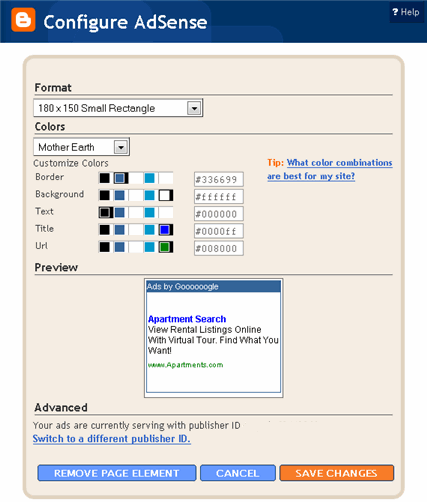
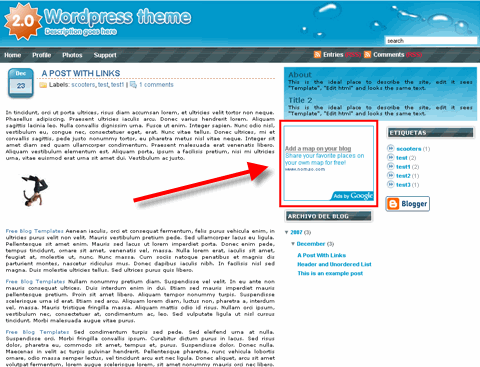
 Google’s advertising program is free to sign up and you can usually be online within an hour or so (assuming your application is approved quickly). Then adding AdSense to your blog is easy especially with Blogger’s new AdSense widget (it’s quite simple with WordPress as well but I’m going to assume WordPress users already know how to do this since it’s just cut and pasting html). Once your application is approved, just log into your account, customize your ad unit, and copy and paste a block of HTML code into your blog. I’ll give you a walkthru of this process.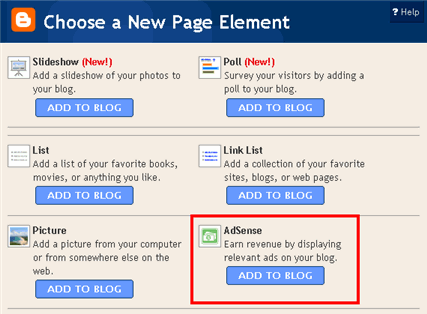
 In the first article of our series, “
 Head over to WordPress.com and in the right hand column, click on the Get a WordPress Blog now » link.
 Next, you’ll need to choose a username, let WordPress know which e-mail to use for correspondence, and whether you agree to the legal terms. WordPress will give you the option of signing up for just the username or securing your own WordPress.com blog. Getting just the username is good if you want to get an Akismet API key or comment on blogs that only allow comments by logged in users. Otherwise, make sure that Gimme a blog! (Like username.wordpress.com) is selected before clicking next.
 If you opted to get a blog, then on the next page, you’ll be able to select a sub-domain on WordPress.com for your blog.
  If everything went smoothly, you’ll be presented with a confirmation screen and an activation e-mail will be sent to the e-mail address you listed during sign up. It’s important that you click on the confirmation link to fully activate your blog. If you don’t click on the link, your blog will not be live and will be up for grabs within two weeks.
 After clicking on the confirmation link in your e-mail, you’ll be greeted with your new username as password. At this point, you can click the link to see your new blog or log in to start playing around with your new blog.
 After selecting your database, click on the SQL tab.
 In the text area that appears, type the following SQL query and click on the ‘Go’ button:
  Return to your database admin page and click on the link to Check All database tables. From the drop down menu, select Optimize Table.

 Since several months there has been a rise in the number of premium themes for WordPress, many of them focusing on providing a newspaper, magazine alike look for WordPress
 The real success of WordPress isn’t just the blog platform software, but the whole community around. And the great plugins.

 While Blogger may not be seen as the most powerful blog management system, it certainly has a loyal following. Beginners and advanced users alike appreciate the simplicity of Blogger, the free hosting and ease of customization.




